• Help Center
  • Client Login
  • Contact
Akisha Networks, Inc.
  • Property Protection
    • Fire Protection
    • Security Alarms
    • Access Control
    • Surveillance
    • Live Guard
    • Audiovisual
    • Dispatch Monitoring
  • Network Maintenance & Management
    • Device Health Monitoring
    • Backup and Recovery
    • Managed Detection and Response
    • Video Monitoring
  • Industries
        • Assisted Living
        • Daycare
        • Retail
        • Multifamily
        • Dealerships
        • Education
        • Healthcare
        • Hospitality
        • Industrial
        • Logistics
        • Nonprofit Organizations
        • Real Estate Development
        • Religious Organizations
        • Transportation
  • About Us
    • Areas We Serve
    • Careers
    • Testimonials
    • Partners
    • Technical Support FAQ
    • New Customer FAQ
  • Blog
  • 713-840-7424
  • Menu Menu

The Hidden Dangers of DIY Security Camera Installation

Security cameras are a smart way to help protect your business. But installing them yourself can cause more problems than it solves. It might seem like you’re saving money, but DIY setups can expose you to dangers.

Continue reading to discover what can go wrong with DIY security camera systems, the common mistakes people make, and why hiring a pro is safer and smarter.
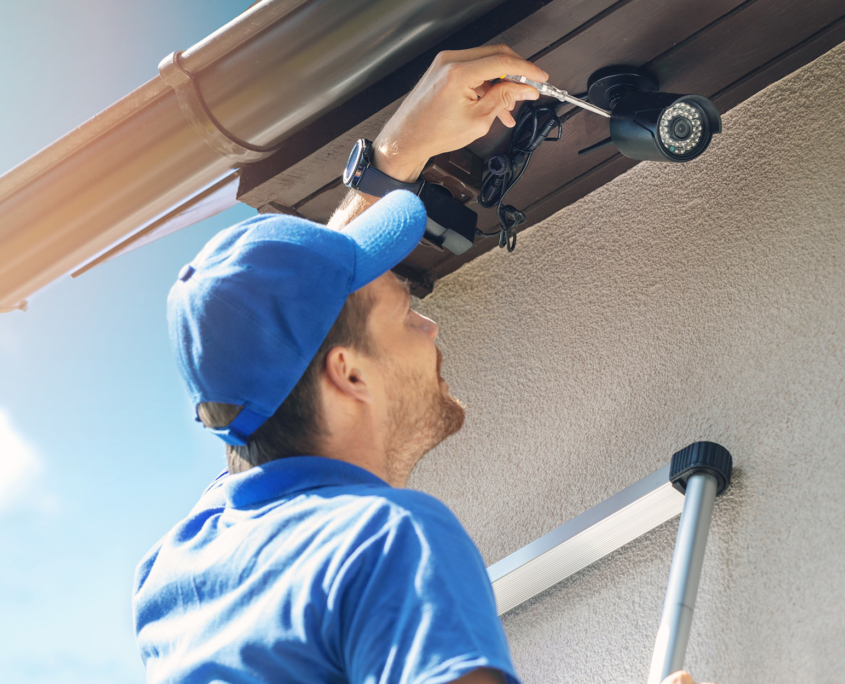
man install surveillance ip camera for home security

Blind Spots and Broken Coverage: What Can Go Wrong with DIY Security Camera Installs

Many businesses try to save money by installing cameras themselves. But cameras might not do their job if they aren’t installed correctly. A system that seems fine initially might not catch important activity when it matters.

Here’s what can happen:

  • Cameras might point in the wrong direction
  • Important areas might not be covered
  • Cameras could be too high, too low, or easy to damage
  • Equipment might not be weatherproof or suitable for your space

These issues create blind spots—places where no one is watching. If something happens there, like a theft or break-in, your system won’t catch it.

Even if your cameras look like they’re working, they might not give you the protection you need. That means you might not have the proof to take action or help the police. Worse, you may not even know something happened until it’s too late.

The Most Common DIY Mistakes That Weaken Your Security

It’s easy to make mistakes when installing DIY security cameras without help. Most people don’t know how to choose the right camera angles, adjust lighting, or connect the system securely to the network. Even small errors during setup can lead to big problems when you need your cameras the most.

Let’s look more closely at some of the most common—and most damaging—DIY mistakes:

Poor Camera Placement Leads to Missed Footage

Cameras that aren’t placed carefully can miss the most important parts of your property. DIY security installers often position cameras too high, too low, or at bad angles. A camera facing into the sun can cause glare, while one set too far away might not capture enough detail to identify people or actions. In some cases, cameras only show the tops of heads or partial bodies—making them useless in an emergency.

Weak Connections Cause Gaps in Coverage

Most security systems need stable Wi-Fi or reliable power to function well. The cameras could often go offline if your DIY system relies on weak internet signals or power sources that aren’t grounded or protected. You might miss a break-in or lose important footage because the camera wasn’t recording when it should have been.

Blocked Views Make Cameras Useless

Even if a camera is installed at the right height and angle, nearby objects can block its view. Things like signs, tall shelves, or overgrown trees can get in the way without you realizing it. Light reflections on glass or nighttime glare from headlights can also ruin footage quality. DIY installers often miss these visual obstacles until it’s too late.

Lack of Cybersecurity Opens the Door to Hackers

DIY security systems often come with factory-default usernames and passwords—and many people never change them. That leaves the system vulnerable to cyberattacks. Hackers can view your video feed, disable your cameras, or use them to spy on your business. Without data encryption or secure logins, your footage and network are at serious risk.

Skipping Software Updates Creates Vulnerabilities

Just like your phone or computer, your security system needs regular updates to stay secure and working properly. DIY users often don’t know updates are needed, or they put them off indefinitely. Outdated systems are more likely to crash, miss recordings, or become easy targets for new hacking methods.

Failure to Test the System Leaves You Guessing

After installing the system, many DIY users assume it’s working fine—but they never test it. Testing under different lighting conditions, weather, and times of day is important. Without it, you may not realize your system isn’t capturing anything useful until an incident occurs. By then, it’s too late to fix.

These problems don’t just make your system harder to use—they make it unreliable when you need it most. Whether it’s blurry video, lost footage, or a hacked camera feed, these issues could leave your business unprotected. In security, reliability is everything—and these DIY mistakes can put that at risk.

Hidden Legal Risks: When DIY Installs Break the Rules

Some business owners are unaware that there are laws regarding where and how security cameras can be used. Ignoring these laws can result in fines or lawsuits.

For example, you might need to:

  • Avoid recording in private areas
  • Let employees or customers know they’re being recorded
  • Save video footage for a certain amount of time
  • Follow audio recording laws that vary by state

A DIY setup might accidentally break these rules, especially if you’re unfamiliar with local or state laws. This could lead to problems with employee trust, customer complaints, or even legal action. Professional installers know these rules and make sure your system follows them. That means you can focus on running your business while staying safe and legal.

When DIY Security Camera Systems Don’t Talk: Integration Issues

A good security setup includes more than just cameras. It might include alarms, access control, or motion sensors. However, many DIY security camera systems don’t connect with these tools. When your systems don’t “talk” to each other, things like this can happen:

  • You need separate apps for different features
  • It takes longer to respond to problems
  • You miss chances to automate smart responses (like turning on lights when motion is detected)
  • Important alerts can get missed or delayed

A professional team can create a setup where everything works together. This saves you time, strengthens your security, and keeps things simple.

Don’t let DIY mistakes leave you open to risk. Discover how Akisha Network’s surveillance systems can enhance your security without issues.  

Our Surveillance Systems

The Real Cost of DIY: Why Saving Now Can Cost You Later

DIY security camera kits are usually cheaper at first, but they often cost more over time. What seems like a deal can turn into a hassle. Cheap equipment tends to break more easily, and setups without professional help can miss important footage.

Fixing these problems takes time and money. If a break-in happens, you might not have the necessary video proof. Plus, a poorly installed system can hurt your insurance claims or even cause legal trouble. Spending a bit more now to hire a professional can save you a lot of stress and money in the future. You’ll get better protection and more peace of mind knowing it’s done right.

Professional Installation Done Right: Why Pros Are Worth It

Professional installers don’t just put up cameras—they create a full plan to protect your business. They know how to check for blind spots, place cameras for the best coverage, and ensure everything works how it should.

They’ll help with:

  • Finding the best spots for cameras:
  • Avoiding bad lighting or tricky angles:
  • Making sure all areas are covered:
  • Setting up strong internet and power connections:
  • Teaching you how to use the system:
  • Testing everything before they leave:

A system installed by pros keeps working without the constant problems you might face with DIY.

Avoid DIY Mistakes With Professional Installation From Akisha Networks Inc.

At Akisha Networks Inc., we create custom security systems for businesses of all sizes. We install them correctly, update them, and ensure everything runs smoothly. If your business is growing or changing, we’ll help your system grow with you. Contact us today to discover how our property protection solutions can help you avoid DIY security mistakes.

Share This Post

  • Share on Facebook
  • Share on X
  • Share on WhatsApp
  • Share on Pinterest
  • Share on LinkedIn
  • Share on Tumblr
  • Share on Vk
  • Share on Reddit
  • Share by Mail

More Like This

How Commercial Security Cameras Can Help Strengthen Employee Safety

How Commercial Security Cameras Can Help Strengthen Employee Safety

Surveillance Systems
https://www.akishanetworks.com/wp-content/uploads/2026/05/How-Commercial-Security-Cameras-Can-Help-Strengthen-Employee-Safety.jpg 1250 2000 AbstraktMarketing /wp-content/uploads/2024/05/ANI-Logo-v3-SayS-white-1030x213-2-300x166.png AbstraktMarketing2026-05-27 08:51:032026-06-02 08:58:07How Commercial Security Cameras Can Help Strengthen Employee Safety
How AI-Powered Surveillance Helps Lean Teams Protect More Ground

How AI-Powered Surveillance Helps Lean Teams Protect More Ground

Surveillance Systems
https://www.akishanetworks.com/wp-content/uploads/2026/05/How-AI-Powered-Surveillance-Helps-Lean-Teams-Protect-More-Ground.jpg 1250 2000 AbstraktMarketing /wp-content/uploads/2024/05/ANI-Logo-v3-SayS-white-1030x213-2-300x166.png AbstraktMarketing2026-05-27 08:38:222026-06-02 08:58:08How AI-Powered Surveillance Helps Lean Teams Protect More Ground
How AI Is Changing the Way Businesses Review Commercial Surveillance Camera Footage

How AI Is Changing the Way Businesses Review Commercial Surveillance Camera Footage

Surveillance Systems
https://www.akishanetworks.com/wp-content/uploads/2026/05/How-AI-Is-Changing-the-Way-Businesses-Review-Commercial-Surveillance-Camera-Footage.jpg 1250 2000 AbstraktMarketing /wp-content/uploads/2024/05/ANI-Logo-v3-SayS-white-1030x213-2-300x166.png AbstraktMarketing2026-05-27 08:28:402026-06-02 08:58:08How AI Is Changing the Way Businesses Review Commercial Surveillance Camera Footage
person checking video surveillance

What Is AI Video Analytics and Why Your Business Cameras Should Have It

Surveillance Systems
https://www.akishanetworks.com/wp-content/uploads/2026/04/person-checking-video-surveillance.jpg 1250 2000 AbstraktMarketing /wp-content/uploads/2024/05/ANI-Logo-v3-SayS-white-1030x213-2-300x166.png AbstraktMarketing2026-04-14 10:59:392026-06-02 08:58:08What Is AI Video Analytics and Why Your Business Cameras Should Have It
AI Securiyt System detecting threat

How AI Security Systems Are Transforming Business Surveillance

Surveillance Systems
https://www.akishanetworks.com/wp-content/uploads/2026/04/AI-Securiyt-System-detecting-threat.jpg 1250 2000 AbstraktMarketing /wp-content/uploads/2024/05/ANI-Logo-v3-SayS-white-1030x213-2-300x166.png AbstraktMarketing2026-04-14 10:45:512026-06-02 08:58:08How AI Security Systems Are Transforming Business Surveillance
Security camera view with AI detection boxes on human figures

How AI Person Detection Works on Security Cameras

Surveillance Systems
https://www.akishanetworks.com/wp-content/uploads/2026/04/Security-camera-view-with-AI-detection-boxes-on-human-figures.jpg 1250 2000 AbstraktMarketing /wp-content/uploads/2024/05/ANI-Logo-v3-SayS-white-1030x213-2-300x166.png AbstraktMarketing2026-04-14 09:34:332026-06-02 08:58:09How AI Person Detection Works on Security Cameras
The Benefits of Cloud-Based Video Surveillance for Commercial Properties

The Benefits of Cloud-Based Video Surveillance for Commercial Properties

Surveillance Systems
https://www.akishanetworks.com/wp-content/uploads/2025/06/The-Benefits-of-Cloud-Based-Video-Surveillance-for-Commercial-Properties.jpg 1250 2000 AbstraktMarketing /wp-content/uploads/2024/05/ANI-Logo-v3-SayS-white-1030x213-2-300x166.png AbstraktMarketing2025-06-26 07:00:502026-06-02 08:58:16The Benefits of Cloud-Based Video Surveillance for Commercial Properties
Security worker during monitoring. Video surveillance system

What Features to Look for in a Modern Business Surveillance System

Surveillance Systems
https://www.akishanetworks.com/wp-content/uploads/2025/05/Security-worker-during-monitoring.-Video-surveillance-system.jpg 1250 2000 AbstraktMarketing /wp-content/uploads/2024/05/ANI-Logo-v3-SayS-white-1030x213-2-300x166.png AbstraktMarketing2025-05-02 14:04:212026-06-02 08:58:19What Features to Look for in a Modern Business Surveillance System
closed circuit camera Multi-angle CCTV system against the background of a modern warehouse

Meta Title: Warehouse Security Camera System: Maximize Your Protection

Surveillance Systems
https://www.akishanetworks.com/wp-content/uploads/2025/05/closed-circuit-camera-Multi-angle-CCTV-system-against-the-background-of-a-modern-warehouse.jpg 1250 2000 AbstraktMarketing /wp-content/uploads/2024/05/ANI-Logo-v3-SayS-white-1030x213-2-300x166.png AbstraktMarketing2025-05-01 07:57:432026-06-02 08:58:19Meta Title: Warehouse Security Camera System: Maximize Your Protection
Previous Previous Previous Next Next Next

Contact Us

"*" indicates required fields

This field is for validation purposes and should be left unchanged.

Stay Connected

Security: B13420
Fire: ACR-1751021
Extinguisher: ECR-258513

Property Protection

Fire Protection

Security Alarms

Access Control

Surveillance Systems

Live Guard

Audiovisual

Dispatch Monitoring

Network Maintenance & Management

Device Health Monitoring

Backup and Recovery

Managed Detection and Response

Video Monitoring

Contact Us

5868 A-1 Westheimer Rd #224, Houston, TX 77057

(713) 840 7424

info@akisha.net

Website by Abstrakt Marketing Group ©
  • Privacy Policy
  • Sitemap
Scroll to top Scroll to top Scroll to top

This site uses cookies. By continuing to browse the site, you are agreeing to our use of cookies.

AcceptLearn more

Cookie and Privacy Settings


How we use cookies

We may request cookies to be set on your device. We use cookies to let us know when you visit our websites, how you interact with us, to enrich your user experience, and to customize your relationship with our website.

Click on the different category headings to find out more. You can also change some of your preferences. Note that blocking some types of cookies may impact your experience on our websites and the services we are able to offer.

Essential Website Cookies

These cookies are strictly necessary to provide you with services available through our website and to use some of its features.

Because these cookies are strictly necessary to deliver the website, refusing them will have impact how our site functions. You always can block or delete cookies by changing your browser settings and force blocking all cookies on this website. But this will always prompt you to accept/refuse cookies when revisiting our site.

We fully respect if you want to refuse cookies but to avoid asking you again and again kindly allow us to store a cookie for that. You are free to opt out any time or opt in for other cookies to get a better experience. If you refuse cookies we will remove all set cookies in our domain.

We provide you with a list of stored cookies on your computer in our domain so you can check what we stored. Due to security reasons we are not able to show or modify cookies from other domains. You can check these in your browser security settings.

Other external services

We also use different external services like Google Webfonts, Google Maps, and external Video providers. Since these providers may collect personal data like your IP address we allow you to block them here. Please be aware that this might heavily reduce the functionality and appearance of our site. Changes will take effect once you reload the page.

Google Webfont Settings:

Google Map Settings:

Google reCaptcha Settings:

Vimeo and Youtube video embeds:

Accept settingsHide notification only